


/1.%20Visuals/Website/Icons/RegulatoryCompliance_Visuals_Navigation%20(1).png?width=40&height=40&name=RegulatoryCompliance_Visuals_Navigation%20(1).png)


/1.%20Visuals/Website/Icons/Testing_Visuals_IconNavigation%20(1).png?width=40&height=40&name=Testing_Visuals_IconNavigation%20(1).png)


/1.%20Visuals/Website/Icons/government%201.png?width=40&height=40&name=government%201.png)
/1.%20Visuals/Website/Icons/energy_utilities%201.png?width=40&height=40&name=energy_utilities%201.png)
/1.%20Visuals/Website/Icons/defense%201.png?width=40&height=40&name=defense%201.png)
/1.%20Visuals/Website/Icons/food%201.png?width=40&height=40&name=food%201.png)
/1.%20Visuals/Website/Icons/finance%201.png?width=40&height=40&name=finance%201.png)
/1.%20Visuals/Website/Icons/manufacturing%201.png?width=40&height=40&name=manufacturing%201.png)


/1.%20Visuals/Website/Icons/CTG%20Academy.png?height=56&name=CTG%20Academy.png)


 Austria
 Belgium
 Denmark
 Germany
 Italy
Italy Romania
 Sweden
 Switzerland
 The Netherlands
 United Kingdom
 United States
Launched in 2020, it has steadily grown into one of the most trusted tools in modern test automation projects, with adoption accelerating rapidly in the past few years.
Now, as we enter the era of AI-augmented development, Playwright has taken a major leap forward with the introduction of Playwright MCP in March 2025 and Playwright Agents in October 2025. Two additions that provide us with intelligent, agentic test automation.
In this blog post, we’ll explore the concepts behind Playwright MCP and Playwright Agents, what they are, how they work, how they interact with LLMs, and why they represent the next paradigm for writing and maintaining tests.
1. Playwright MCP
MCP stands for Model Context Protocol, an open standard created by Anthropic and adopted by many companies, including Microsoft for Playwright.
An MCP is the bridge that allows LLMs (Large Language Models like ChatGPT, Claude, Gemini,...) to safely and reliably interact with tools, APIs and applications in a standardized, secure way.
Before MCP, every AI tool needed its own custom integration with an application, API or test automation framework. This caused problems:
- duplicated integrations
- inconsistent capabilities
- security challenges
- no standard way for AI to access tools
MCP solves this by defining a shared, open protocol.
For Playwright MCP, this means that it provides:
- A well-defined set of tools that can be used: The Playwright functions like page.goto, page.click, page.getByText, ...
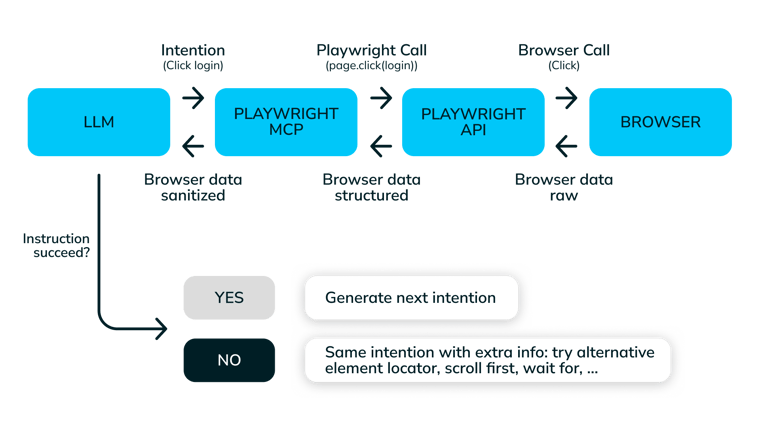
- A sandboxed environment: The LLM can only request what Playwright can do with the browser (e.g. click on an element, open a page) and Playwright MCP returns only the information that the LLM is allowed to know (e.g. DOM trees, errors, events).
- Strict security and safety rules: The LLM has no direct control over the browser protocol, network requests, local storage, custom javascript code execution, ...
- A standard format for interactions between the LLM and Playwright
The LLM requests an “intention”, and Playwright MCP decides whether and how to execute them through Playwright.
2. Playwright Agents
The Playwright Agents are specialized, thin orchestrators built around an LLM for Playwright. The LLM is external.
You can think of the Playwright Agents as:
- the reasoning loop supervisor
- the translator between LLM instructions and browser commands
- the executor of actions
- the safety + structure layer
The intelligence (understanding instructions and making decisions) comes from the LLM model, not from Playwright itself.
By creating a LLM independent agent, test generation relies on the selected LLM to interpret your natural-language instruction and decide:
- what steps to perform
- which element locators to use
- how to structure the test
- how verbose or concise the tests are
- how resilient the test is (e.g. retries, robustness)
- what coding style to use (e.g. async/await, comments, types)
Since each LLM has different reasoning abilities, styles, and training data, the output varies between the chosen LLM and you can choose yourself the best suited one for your project.
If Playwright MCP is the bridge, as mentioned in previous chapter, Playwright Agents are the intelligent workers crossing it.
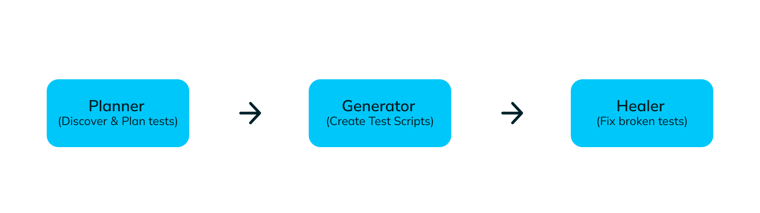
There are 3 Agents in Playwright:
- Planner Agent
- Generator Agent
- Healer Agent
These agents work together (and individually) to turn natural language instructions into valid and stable Playwright tests.
2.1 Planner Agent
The planner agent can be seen as the project manager of the AI based test creation.
It will try to discover test cases by:
- interpreting your natural-language instructions, which can be very general (e.g. “create test cases for my web application”) or very specific (e.g. “create test cases for the checkout page on my e-commerce application”)
- exploring the web application automatically through the Playwright MCP tools
- identifying the needed user flow(s)
- creating scenarios and breaking them down into test steps
The output of these actions will be a human-readable test plan in markdown format (.md).
Example basic-operations.md:
| # Test Plan: Basic Operations ## Overview This plan covers essential user flows for the Example App homepage. ### Scenarios 1. **Navigate to Homepage** - Open `https://example.com` - Verify page title contains "Example Domain" 2. **Click "More information" Link** - Locate link with text "More information" - Click the link - Verify navigation to IANA page 3. **Check Heading** - Ensure first `<h1>` element is visible - Assert text equals "Example Domain" |
2.2 Generator Agent
The generator agent acts as the developer of your automated test cases.
It will write the actual Playwright test code by:
- getting the markdown test plan from the agent
- trying to execute the steps on the web application automatically through the Playwright MCP tools. During this action it defines the element selectors, assertions and setup code. It will retry an action (like selecting an element in a dropdown) in different ways until it actual works.
The output of these actions will be files containing coded tests (.spec).
Example test.spec.ts:
| Import { test, expect } from '@Playwright/test'; test.describe('Basic Operations', () => { test('Navigate to Homepage and verify title', async ({ page }) => { await page.goto('https://example.com'); await expect(page).toHaveTitle(/Example Domain/); }); test('Click "More information" and verify navigation', async ({ page }) => { await page.goto('https://example.com'); await page.getByRole('link', { name: 'More information' }).click(); await expect(page).toHaveURL(/iana\.org/); }); test('Check heading text', async ({ page }) => { await page.goto('https://example.com'); const heading = page.locator('h1'); await expect(heading).toBeVisible(); await expect(heading).toHaveText('Example Domain'); }); }); |
2.3 Healer Agent
The healer agent acts as the bug fixer of your automated test cases.
When a test fails, the healer will:
- navigate to the page where the step is failing
- inspect the live DOM
- ask the LLM to determine what changed
- propose a patch (new element selector, element interaction or updated flow)
- update the impacted test(s) automatically if allowed
3. Using Playwright MCP or Playwright Agents
3.1 LLM interacts directly with Playwright MCP
The LLM sends MCP commands directly to Playwright to execute an action in the browser.
Pros:
- Lower latency: There is direct communication without intermediate layers.
- Full control: You can build your own agent to manage prompts, enforce safety rules, add domain specific knowledge, define how to generate the test cases, ...
Cons:
- LLM must handle everything: Planning, error recovery, retries, interpreting DOM and validating output.
- Test Generations: given prompts need clear multi-step reasoning.
- Limited autonomy: The LLM is stateless between calls unless you build session memory.
- More brittle: If the LLM hallucinates or makes a mistake, there is no built -in correction phase.
High level code example:
| sync with ClientSession(*stdio) as session: # Initialize and discover server capabilities await session.initialize() tools = await session.list_tools() print("Available tools:", [t.name for t in tools.tools]) # 1) Navigate result_nav = await session.call_tool("browser_navigate", {"url": "https://example.com"}) print("Navigate result:", result_nav) # 2) Grab an accessibility snapshot (LLM-friendly DOM) result_snap = await session.call_tool("browser_snapshot", {}) # The content contains structured text/ARIA data that your LLM can reason over print("Snapshot length:", len(result_snap.content[0].text)) # 3) Click a link by visible text (example; adjust to your page) result_click = await session.call_tool("browser_click_text", {"text": "More information"}) print("Click by text result:", result_click) # 4) Cleanly close await session.call_tool("browser_close", {}) |
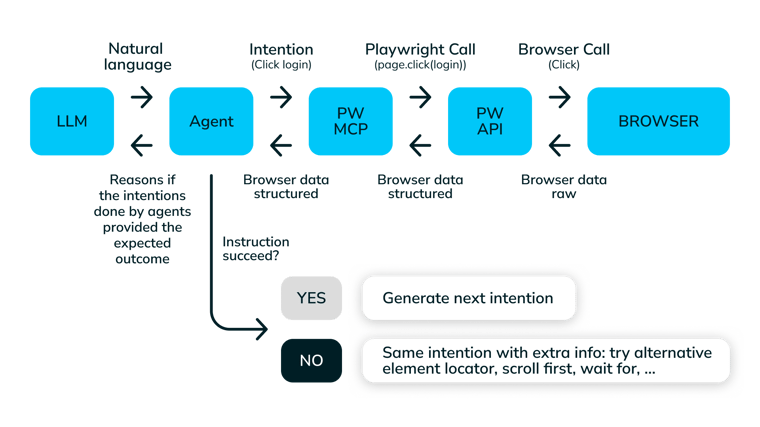
3.2 LLM interacts with Playwright Agent
The LLM instructs a Playwright Agent to execute an action in the browser
Pros:
- Separation of concerns: LLM focuses on reasoning, while the agent handles execution details.
- Built in reliability: The agents provide more consistent tests by having planning, validation and healing in the agent pipeline.
- Standardized workflow: Everyone uses the same tested and optimized process. No need to reinvent prompt engineering or agent design
- Better scalability: You can easily swap LLMs or add multi-step workflows.
- Higher productivity: The heavy lifting is done by the agents.
Cons:
- Extra layer: More overhead and complexity
- Standardized workflow: The tests are generated according to Playwright’s design.
- Harder to debug internal logic: The agents operate like a block box, you get the result, not the internal trace.
High level code example:
| #1) Natural-language task; agent decides which tools to call & in what order instruction = """ Open https://example.com, click the link with text 'More information', then extract the first <h1> you see and return it as plain text. """ result = agent.run(instruction) |
4. Should we start using Playwright Agents?
With all this new exciting functionality, we would almost forget that there are some downsides on using the Playwright Agents:
- Limited Control & Predictability: The agents rely on LLM reasoning, which can introduce non-deterministic tests
- Quality: The quality of the generated test rely on the prompt design and the UI/flow interpretation of the LLM.
- Standard: The agents don’t provide the possibility to use custom test structure, test formatting, custom locator strategy, 3th party integration, ...
- Resources: Agents need to spin up LLM’s and browser sessions which increases CPU/RAM usage, but especially execution time.
- Governance & Security Concerns: Access to LLM models could be an issue for sensitive apps or regulated environments
- Debugging Complexity: When something goes wrong, it can be an issue with the agent, the LLM or Playwright.
- Costs: The agents have a bigger impact on your infrastructure, but also the cost of an LLM license can increase exponentially for large scale testing activities.
So if speed and having automation matters more than absolute control and cost, definitely give Playwright Agents a go! They give us a new step in the exciting times to come for test automation!

/1.%20Visuals/Website/Icons/x-twitter.svg)


