


/1.%20Visuals/Website/Icons/RegulatoryCompliance_Visuals_Navigation%20(1).png?width=40&height=40&name=RegulatoryCompliance_Visuals_Navigation%20(1).png)


/1.%20Visuals/Website/Icons/Testing_Visuals_IconNavigation%20(1).png?width=40&height=40&name=Testing_Visuals_IconNavigation%20(1).png)


/1.%20Visuals/Website/Icons/government%201.png?width=40&height=40&name=government%201.png)
/1.%20Visuals/Website/Icons/energy_utilities%201.png?width=40&height=40&name=energy_utilities%201.png)
/1.%20Visuals/Website/Icons/defense%201.png?width=40&height=40&name=defense%201.png)
/1.%20Visuals/Website/Icons/food%201.png?width=40&height=40&name=food%201.png)
/1.%20Visuals/Website/Icons/finance%201.png?width=40&height=40&name=finance%201.png)
/1.%20Visuals/Website/Icons/manufacturing%201.png?width=40&height=40&name=manufacturing%201.png)


/1.%20Visuals/Website/Icons/CTG%20Academy.png?height=56&name=CTG%20Academy.png)


 Global
 Austria
 Belgium
 Denmark
 Germany
 Italy
Italy Romania
 Sweden
 Switzerland
 The Netherlands
 United Kingdom
 United States
In this blog, we take the next step: how do you guide employees so they can build personal AI agents safely, purposefully, and with real added value?
Employees building agents is inevitable, and that’s okay
Once Copilot is available in an organization, employees will start experimenting with agents. Some organizations consciously allow this broadly and actively encourage experimentation. Others first establish clear guidelines and restrictions. The Flemish government, for example, put governance agreements in place before allowing agent development more widely.
The reality for IT: You can limit agent creation to specific user groups, but you can’t fully separate agent usage from agent creation without removing functionality. That’s why the key question shifts from “How do we turn this off?” to “How do we guide and frame this properly?”
With the right guidance, personal agents don’t become a risk, but a controlled learning step towards valuable AI applications.
Don’t start with agents. Start with Copilot fundamentals
It’s wise not to let employees jump straight into building agents, but to first focus on personal productivity with Copilot:
- What can Copilot do—and what can’t it do?
- How do you “talk” to Copilot?
- How do you provide the right context?
- How do you validate and verify results?
Only once users understand these basics do personal agents become the logical next step in the adoption curve.
These skills are also the foundation for successful adoption. In Increase the ROI of Microsoft Copilot with adoption and change management, we explain how training and guidance make the difference. Prompting in Microsoft 365 Copilot: core competencies for working smarter goes deeper into how users can effectively steer Copilot.
Once these fundamentals are in place, the next step becomes natural: learning how to build a personal AI agent.
Teaching employees how to build a personal AI agent
When employees have mastered the basics of Copilot, it’s time to introduce them to personal AI agents. The focus at this stage is deliberately on individual use: an agent that helps one person work faster, more consistently, or more efficiently within their own context.
In this phase, employees learn:
- how to set up, test, and refine an agent
- how knowledge bases work, and which sources are suitable, or not
- where the limits of an agent lie: what works well, and what doesn’t
By using agents personally first, there’s room to experiment without risk. Employees build confidence, learn to critically assess output, and get a realistic sense of how much value an agent can add to their day-to-day work.
From personal agent to shared AI agent
Only once a personal agent has proven its value does the next step come into view: sharing it with others. This can be within a team, a department, or a specific role. This phased approach prevents half-finished or poorly aligned agents from spreading uncontrollably across the organization.
By starting small and scaling later:
- agent quality remains higher
- agent sprawl is avoided
- buying grows because the value is already visible
Many organizations follow this pattern as a standard approach: first learn and optimize individually, then share in a controlled way. This allows personal AI agents to naturally grow into reusable tools that deliver real value, without losing control.
Guidance makes the difference: train, test, and continuously improve
In practice, we often see that employees want to get started, but don’t quite know where to begin. Time pressure, uncertainty about outcomes, and questions like “Is this the right approach?” create barriers. Without guidance, personal AI agents either remain isolated experiments, or aren’t used at all. That’s why guidance isn’t a luxury, but a critical success factor.
Effective guidance consists of multiple, interconnected elements:
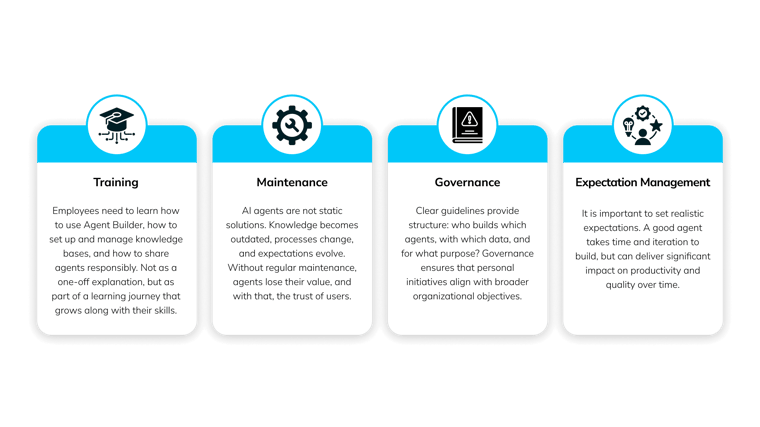 With the right support, personal AI agents evolve from isolated experiments into sustainable tools that continue to improve and deliver real value, for both employees and the organization.
AI agents in practice: familiar use cases
In many organizations, employees start with small, recognizable agents that directly support their daily work. These use cases are easy to test, lowthreshold, and quickly make the value of personal AI agents tangible.
Document Assistant
Creates documents based on fixed structures and guidelines, such as proposals, reports, meeting minutes, or regulatory documentation. Employees provide input, after which the agent automatically generates the document in the correct format, consistent, complete, and aligned with agreed standards.
FAQ Agent
Answers questions based on an internal knowledge base, helping employees find information quickly without repeatedly contacting the same experts. Especially valuable for IT teams and support functions dealing with many recurring questions.
Troubleshooting Agent
Helps explain and resolve concrete issues using existing documentation. For example, it can clarify error messages such as “Why can’t I send my proposal?” or “How do I resolve error X?”, often used within CRM or ERP environments.
Tone of Voice Assistant
Automatically rewrites texts according to the organization’s agreed tone of voice. It takes wording, style, and sensitivities into account, ensuring consistent and professional communication without extra editorial work.
Workflow Automation Agent
Supports simple workflows by preparing or partially automating tasks. For example, it can read incoming emails, summarize them, and draft a response, leaving the employee to review and approve.
Conclusion: from sprawl to value
Building AI agents yourself is not a hype, it’s a lasting reality for organizations working with Copilot. By making deliberate choices early on around governance, skills, and guidance, organizations can prevent experimentation from turning into uncontrolled sprawl.
When organizations:
- establish clear governance,
- train employees in Copilot fundamentals first,
- provide step-by-step guidance,
- and start with realistic, recognizable use cases,
Personal AI agents grow into reliable tools rather than risks. The result is a powerful accelerator for productivity, knowledge sharing, and quality; with control, buying, and sustainable impact.
/1.%20Visuals/Website/Icons/x-twitter.svg)


